Retrofit Guide
Retrofit the 22 IDEX V2 with Phoenix Contact distribution blocks and build plate securing cables: wire removal, stacking, rewiring and cable tensioning.
This guide covers the installation of upgraded components for Vision Miner 22IDEX V2 printers, including Phoenix Contact distribution blocks and build plate securing cables. These retrofits improve electrical reliability and build plate stability.
Before you begin - safety and risk
Read the Safety - Before You Begin article to understand the hazards involved in working on the Vision Miner 22IDEX V4 - including electrical, thermal, mechanical, and chemical risks. All procedures in this wiki are provided as recommendations only. By choosing to follow any procedure, you do so at your own risk.
Installation of Distribution Blocks
- Verify parts. Ensure you have the Phoenix Contact distribution blocks: 10 blocks for Tool 0 side and 9 blocks for Tool 1 side.
-
Gather tools. You will need a 2 mm or 2.5 mm hex screwdriver and pliers.
-
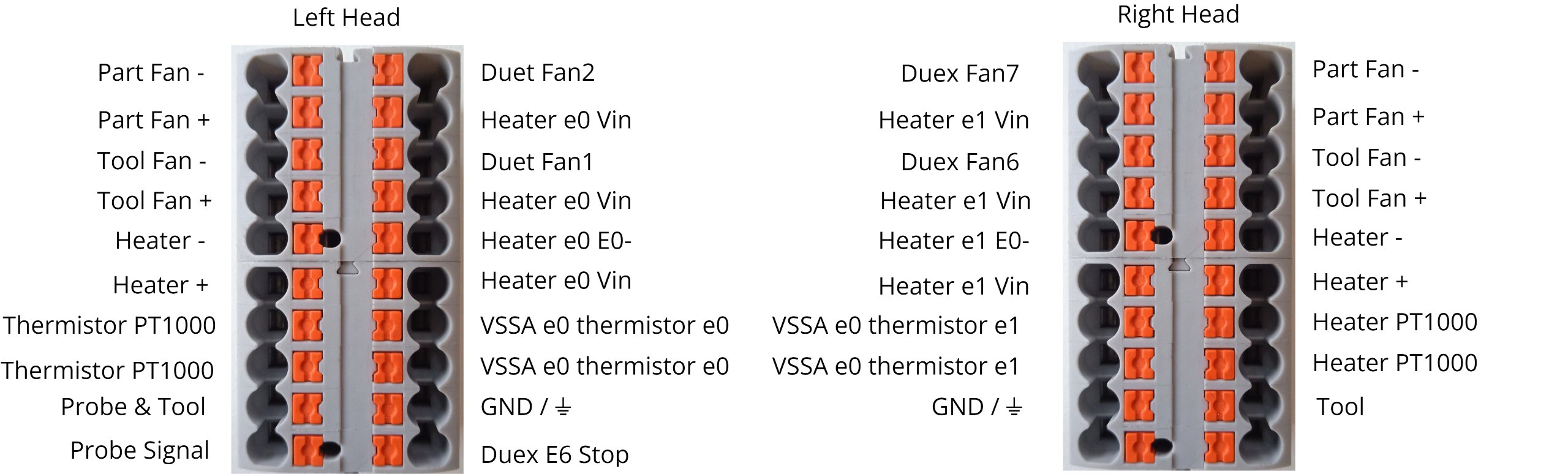
Prepare documentation. Have wiring schematics and tool head wiring diagrams ready. Take pictures of the existing wiring before starting to ensure correct reconnection.
- Stack the distribution blocks. For the Tool 0 side, stack 10 blocks together. For the Tool 1 side, stack 9 blocks together.
- Power off the machine. Ensure the machine is powered off and unplugged before proceeding.
Always disconnect power before working with electrical components to prevent shock or short circuits.
- Remove the old blocks. Use the hex screwdriver to push the orange tab/pin on the Phoenix Contact distribution block. Gently disengage the spring-loaded pin to release the wires. Avoid pulling wires forcefully - lightly pull once disengaged.
- Disconnect all wires. Repeat the wire removal process for all 20 connectors (10 on Tool 0 side, 10 on Tool 1 side). Handle wires gently to avoid damage.
-
Photograph the wiring. Take detailed photographs of the wiring configuration for reference during reconnection.
-
Slide out the old blocks. The old blocks are mounted on rails. Slide them upward to remove from the mounting rails.
- Install the new blocks. Slide the new stacked distribution blocks onto the rails in the same position as the old blocks.
- Reconnect the wires. Follow the photographs and wiring schematics to reconnect all wires to the correct terminals on the new distribution blocks.
- Verify all connections. Ensure each wire is securely inserted into its terminal. Double-check all connections against your photographs and schematics before powering the machine.
Installation of Build Plate Securing Cables
- Verify parts. Ensure you have three build plate securing cables (one for each corner: left, right, and rear).
-
Gather tools. Ensure you have tools to tighten the cables securely (typically pliers or a wrench).
-
Locate the mounting points. Identify the three corners of the build plate: left, right, and rear. Each corner has a pre-drilled hole in the build plate and a corresponding standoff.
- Position the first cable. Starting with the left corner, loop the cable around the hole in the build plate and the corresponding standoff.
- Secure the first cable. Tighten the cable securely to ensure the build plate corner is stable. The cable should be tight enough to prevent movement but not so tight that it deforms the build plate.
- Attach the right corner cable. Repeat the positioning and securing process for the right corner of the build plate.
- Attach the rear corner cable. Repeat the positioning and securing process for the rear corner of the build plate.
- Verify all cables. Check that all three cables are securely tightened and the build plate is stable at all corners.
FAQ
Troubleshooting
Support
If you could not find an answer here, reach out to our support team.