Chamber Heater Issues
Diagnose a chamber heater that will not heat on the 22 IDEX V3 — sensor check, manual 70 °C test, SSR LED, terminal screws and heater resistance in ohms.
This guide helps you troubleshoot and resolve issues with the chamber heater in the Vision Miner 22IDEX V3. The chamber heater is highly reliable and failures are rare. If you suspect a malfunction, follow each step in this guide to confirm the diagnosis before replacing components.
Before you begin - safety and risk
Read the Safety - Before You Begin article to understand the hazards involved in working on the Vision Miner 22IDEX V3 - including electrical, thermal, mechanical, and chemical risks. All procedures in this wiki are provided as recommendations only. By choosing to follow any procedure, you do so at your own risk.
Verifying Chamber Temperature Sensor
- Ensure your printer is at room temperature with no active heaters. Wait until all temperatures read near ambient conditions.
- On the Web Interface, go to the Dashboard.
- Click the Extra tab where you see the Chamber Heater.
- Confirm that the Chamber temperature matches the other idle temperatures (hotend, bed) within a few degrees of ambient.
- If the Chamber temperature is significantly higher than ambient (but physically cold to the touch), you may have a worn or faulty temperature sensor that needs replacement.
- If the Chamber temperature is correct (matches ambient), proceed to the next section.
Set Temperature Manually
- On the Web Interface, at the top part of any tab, find the section labeled Tools.
- At the bottom, locate the line for Chamber with two dropdowns.
- Set both the Active and Standby temperature dropdowns to 70°C.
- Switch back to the Extra tab and observe if the Chamber Heater temperature is increasing.
- The chamber fan should start spinning after the heater temperature exceeds approximately 70°C.
- Evaluate the results:
- If the Chamber Heater temperature does not increase: Proceed with the hardware checks in the next sections.
- If the Chamber Heater temperature increases: The chamber heater is functioning correctly. Verify the chamber fan starts spinning after exceeding 70°C. You will hear the fan and feel airflow from the chamber heater area. If the fan does not start, contact support for replacement parts.
Power off before hardware checks
Always ensure the printer is powered off and unplugged before performing any hardware checks or replacements. Handle electrical components carefully to prevent damage or injury.
Check the Solid-State Relay (SSR)
- The printer uses a solid-state relay (SSR) to power the chamber heater.
- While the chamber heater is enabled (you have set a temperature above ambient, e.g., 70–100°C), look for a small red LED on the SSR itself.
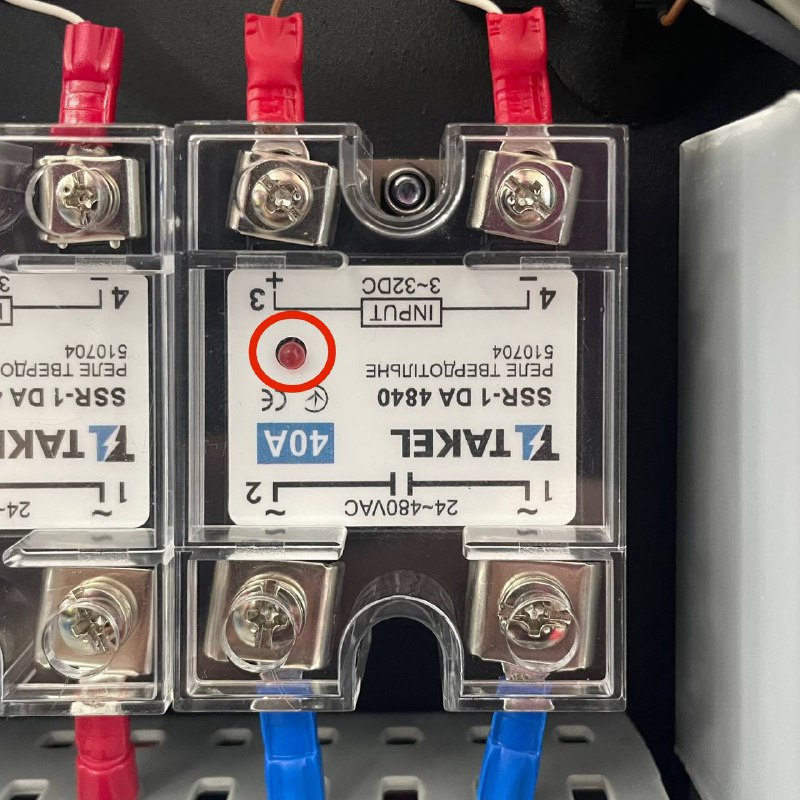
- Evaluate the LED status:
- If the LED is lit: The relay is sending power to the heater. Proceed to the next section.
- If the LED is not lit: The relay may be faulty or not receiving the correct signal. Inspect the chamber heater signal wire plug on the board and the 4 screws on the SSR. The relay likely needs replacement.
Check Terminal Connections
Disconnect power before servicing
Turn off the printer and unplug it from the wall to ensure there is absolutely no power. Wait at least 60 seconds for any residual charge to dissipate.
- Locate the 4 terminals on the SSR.
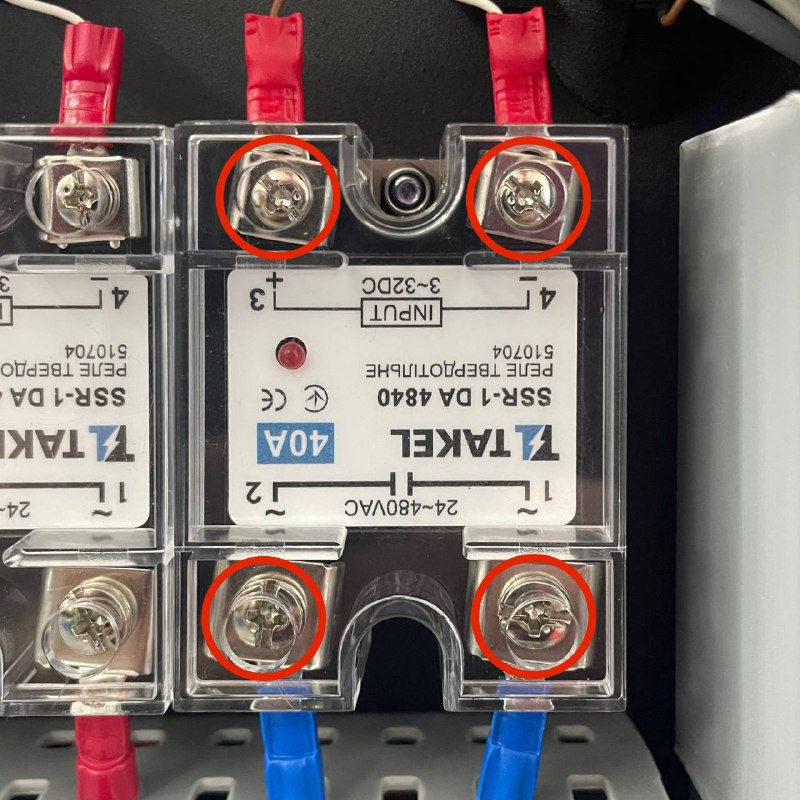
- Use a screwdriver to gently tighten each terminal screw, ensuring wires are firmly seated and not loose.
- Pull lightly on the wires to confirm they are secured and cannot easily detach.
- Verify that the signal wire going into the SSR (the smaller-gauge wire) is properly connected.
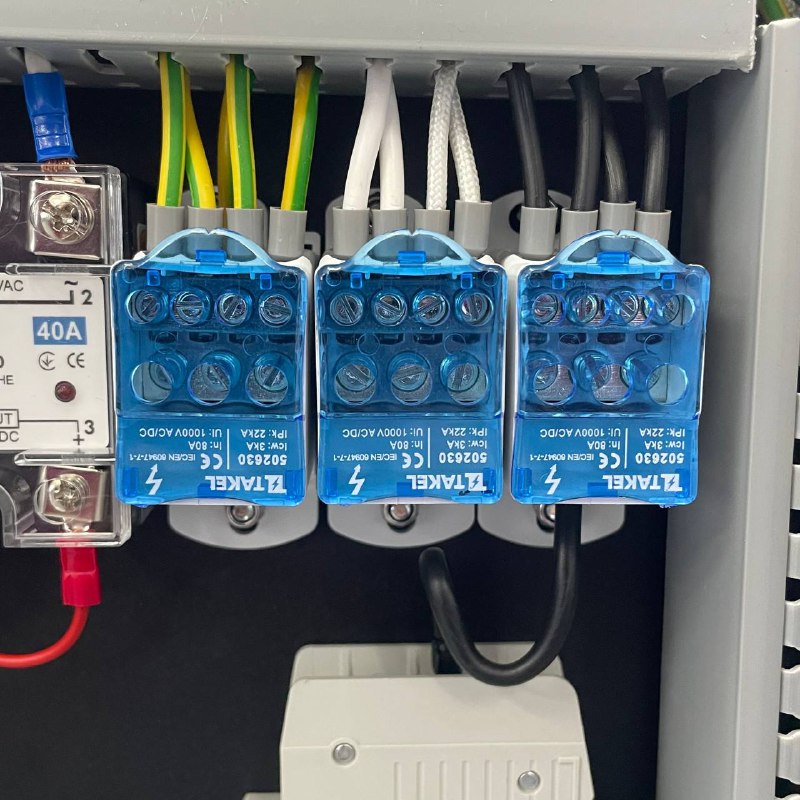
- Above the breaker, locate the high-voltage distribution blocks with blue covers.
- Carefully remove these covers (if necessary) and ensure all wire connections are tight and properly seated.
Check Heater Resistance
- Confirm once again that the printer is completely powered off and unplugged from the wall.
- Identify the two wires from the chamber heater that connect to the bottom of the SSR (the high-voltage side).
- Gently remove them to isolate the heater.
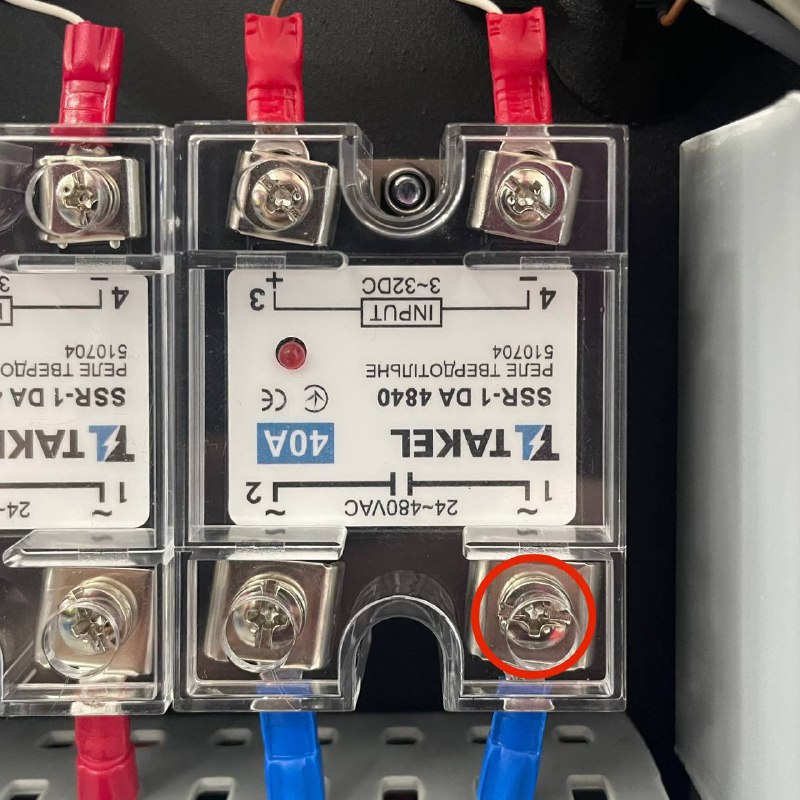
- Use a multimeter set to resistance (Ohms) mode.
- Touch the probes to the disconnected heater wire from the SSR and neutral terminal on the distribution block.
- Evaluate the resistance reading:
- A functioning chamber heater typically shows a resistance between 50–60 Ω for 110 V and 250–270 Ω for 220 V.
- If your reading is significantly higher or lower than this range, the chamber heater is likely defective and needs replacement.
Re-check After Repairs
- After any hardware replacement or wiring fix, repeat the Set Temperature Manually test (steps 5–9).
- Confirm the temperature rises on the graph and the chamber fan operates correctly.
FAQ
Support
If you could not find an answer here, reach out to our support team.