Filament Tube Compressing
PTFE guide tube buckling like an accordion means the filament is blocked - check the spool for tangles, clear the path, and replace a kinked tube.
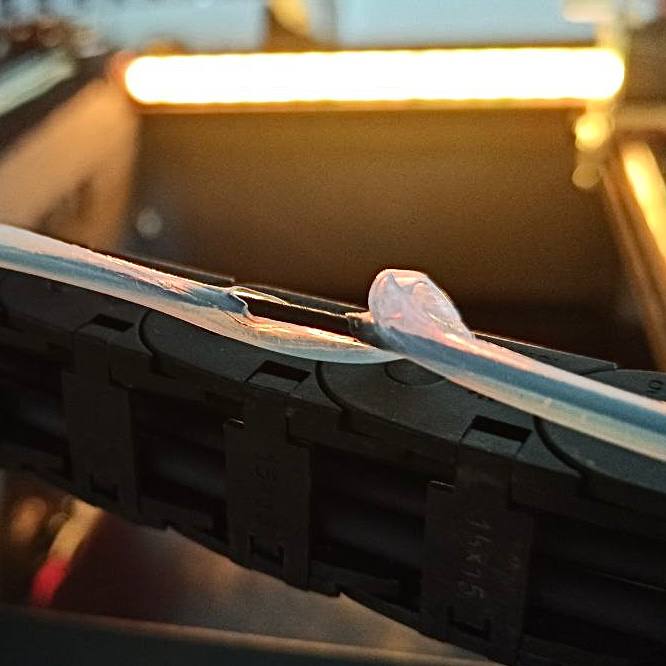
This article addresses an issue where the filament guide tube (PTFE tube) between the filament sensor and the extruder compresses or "crumbles" like an accordion. This deformation indicates a filament feeding problem - the extruder is pushing filament that cannot move forward due to an obstruction, and the compressive force buckles the thin-walled tube.
Before you begin - safety and risk
Read the Safety - Before You Begin article to understand the hazards involved in working on the Vision Miner 22IDEX V4 - including electrical, thermal, mechanical, and chemical risks. All procedures in this wiki are provided as recommendations only. By choosing to follow any procedure, you do so at your own risk.
Tools and Materials
- Visual inspection aid (flashlight or good lighting)
- Flush cutters (for cleanly cutting filament if needed)
- Replacement PTFE tube (if current tube is damaged)
- Thicker-walled PTFE tube (optional upgrade)
Diagnostic Procedure
1. Identifying the Issue
Do not force filament movement
Avoid forcibly pulling or pushing filament if it feels significantly stuck. This can damage the extruder mechanism or other components.
- If the issue occurred during a print, cancel the print job from the printer's interface.
- If any parts like the nozzle were heated, allow them to cool to a safe temperature.
- Visually inspect the filament guide tube that runs from the filament sensor towards the extruder.
- Look for signs of compression, buckling, or an "accordion-like" deformation in the tube. This indicates excessive axial force on the tube.
2. Understanding the Cause
The filament tube compresses because:
- The extruder motor is actively trying to push filament towards the hotend.
- The filament itself is encountering resistance and cannot move freely. Common points of resistance include tangled filament on the spool or obstructions in the path.
- Since the filament is relatively rigid and cannot compress, the force exerted by the extruder motor is transferred to the guide tube.
- The guide tube, typically made of PTFE, is relatively thin-walled and flexible, causing it to buckle or "crumble" under this compressive load.
3. Inspecting the Filament Path
Carefully examine the entire filament path for any signs of obstruction or restriction.
- Check the filament spool:
- Inspect the filament spool for any tangles or crossovers. Filament can sometimes get wound incorrectly, causing it to snag and prevent smooth unwinding.
- Ensure the spool can rotate freely on its holder.
- Examine filament entry points:
- Check where the filament enters the filament sensor and where it enters the extruder assembly.
- Ensure there are no sharp bends, kinks, or debris obstructing the filament's entry.
- Inspect the tube internally (if possible):
- If the tube is easily detachable and the filament is removed, check if there's any internal debris or kinking within the tube itself.
4. Resolving Filament Obstructions
Once the cause of the filament restriction is identified, take the appropriate steps:
- Untangle filament: If the filament is tangled on the spool, carefully unwind the tangled portion and ensure the filament feeds smoothly off the spool. You may need to manually feed some length to confirm.
- Clear obstructions: If an obstruction is found elsewhere (e.g., a piece of debris, a poorly routed tube creating a sharp bend), remove the obstruction or reroute the tube for a smoother path.
- Re-feed filament: After resolving the obstruction, carefully re-feed the filament towards the extruder.
Prevent spool tangles
When loading new spools, always secure the loose end of the filament to prevent it from tangling during storage or handling.
5. Assessing Tube Damage and Replacement
After addressing the filament obstruction, assess the condition of the filament guide tube.
- If the tube is only slightly compressed but springs back to its original shape and allows smooth filament passage, it may still be usable. However, monitor it closely.
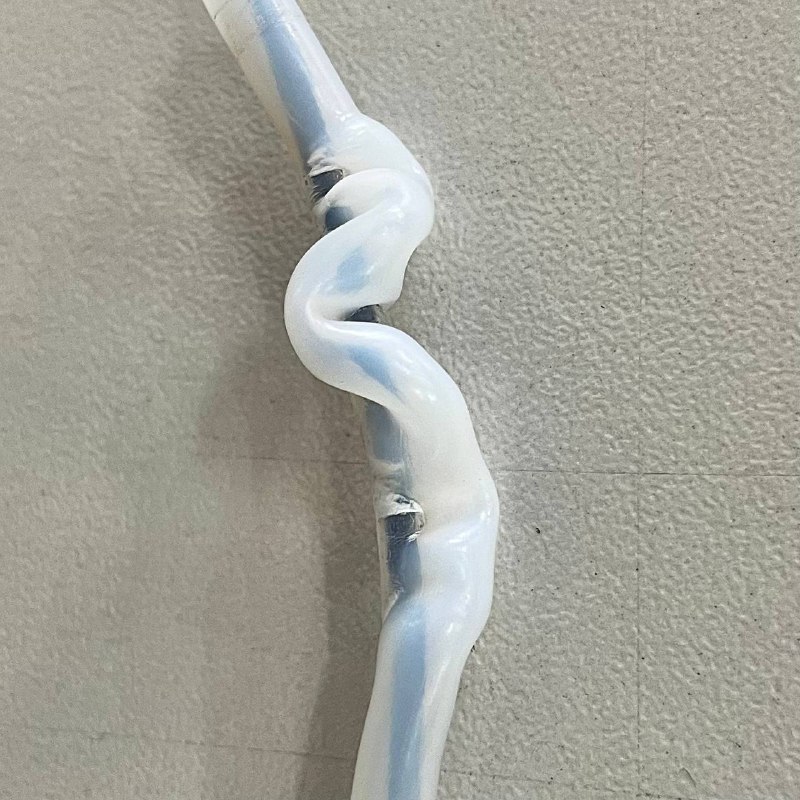
- If the tube is severely kinked, creased, or permanently deformed, it can create ongoing friction and feeding issues. In such cases, the tube should be replaced.
- To obtain a replacement PTFE tube for the Vision Miner 22IDEX V4, see the Filament PTFE Tube Replacement guide.
6. Considering a Thicker Tube (Optional Upgrade)
If you find that the filament tube compression issue occurs frequently, even after ensuring a clear filament path, you might consider upgrading to a thicker-walled PTFE tube. A thicker-walled tube offers greater resistance to compression and can be more durable in demanding situations or with particularly rigid filaments.
Troubleshooting
FAQ
Support
If you could not find an answer here, reach out to our support team.