Nozzle Leaking
Stop filament leaking from the nozzle threads on the 22 IDEX V3: cold pull first, then tighten the nozzle hot to 1.5 Nm while holding the heater block.
This guide details the correct procedure for tightening the nozzle on the Vision Miner 22IDEX V3 hotend. Proper tightening ensures a leak-proof seal between the nozzle and the heatbreak, which is essential for reliable printing and preventing filament leaks. An improperly tightened nozzle can lead to filament leaking from the threads above the nozzle, causing print failures and potentially damaging hotend components. This procedure must be performed while the hotend is heated and only after all filament has been completely removed via a Cold Pull. Tightening must be done while hot because thermal expansion affects the components – tightening cold will likely result in leaks once the hotend reaches operating temperature.
Before you begin - safety and risk
Read the Safety - Before You Begin article to understand the hazards involved in working on the Vision Miner 22IDEX V3 - including electrical, thermal, mechanical, and chemical risks. All procedures in this wiki are provided as recommendations only. By choosing to follow any procedure, you do so at your own risk.
Tools & Materials
- 7 mm Wrench (or 7 mm Socket Wrench for the nozzle)
- 12 mm Wrench (or Adjustable Wrench for holding the heater block)
- Torque Wrench (with 7 mm socket, Optional but recommended)
- Heat-Resistant Gloves (Mandatory)
Filament Removal
- Before heating the hotend for tightening, all filament must be removed from the melt path. If filament remains, heating it without extrusion can cause it to expand, degrade, burn, and solidify, leading to a difficult-to-clear clog in the nozzle and heatbreak.
- Perform a Cold Pull procedure to effectively remove all filament residue from the nozzle and hotend internals.
- Follow the detailed instructions in the Cold Pull Procedure Guide. Do not proceed until you are confident the hotend is clear of filament.
Heating the Hotend
- From the Web Interface, heat the hotend to approximately 20°C higher than your typical printing temperature for the last material used (or a high-temperature material like ABS/PC if unsure). For example, if you normally print PETG at 260°C, heat to 280°C. If you regularly print PEEK at 380°C, heat to 400°C.
- Allow the hotend to sit at the target temperature for at least 2 minutes. This ensures all components have reached thermal equilibrium and expanded fully.
Tightening the Nozzle
- Equip your heat-resistant gloves before touching any hotend components.
- Using the 12 mm wrench (or adjustable wrench), carefully but firmly grip the heater block. Ensure you have a stable hold and are not putting stress on the wiring or thermistor/heater cartridge.
- Place the 7 mm wrench or socket onto the nozzle. Gently turn the wrench clockwise to tighten the nozzle against the heatbreak.
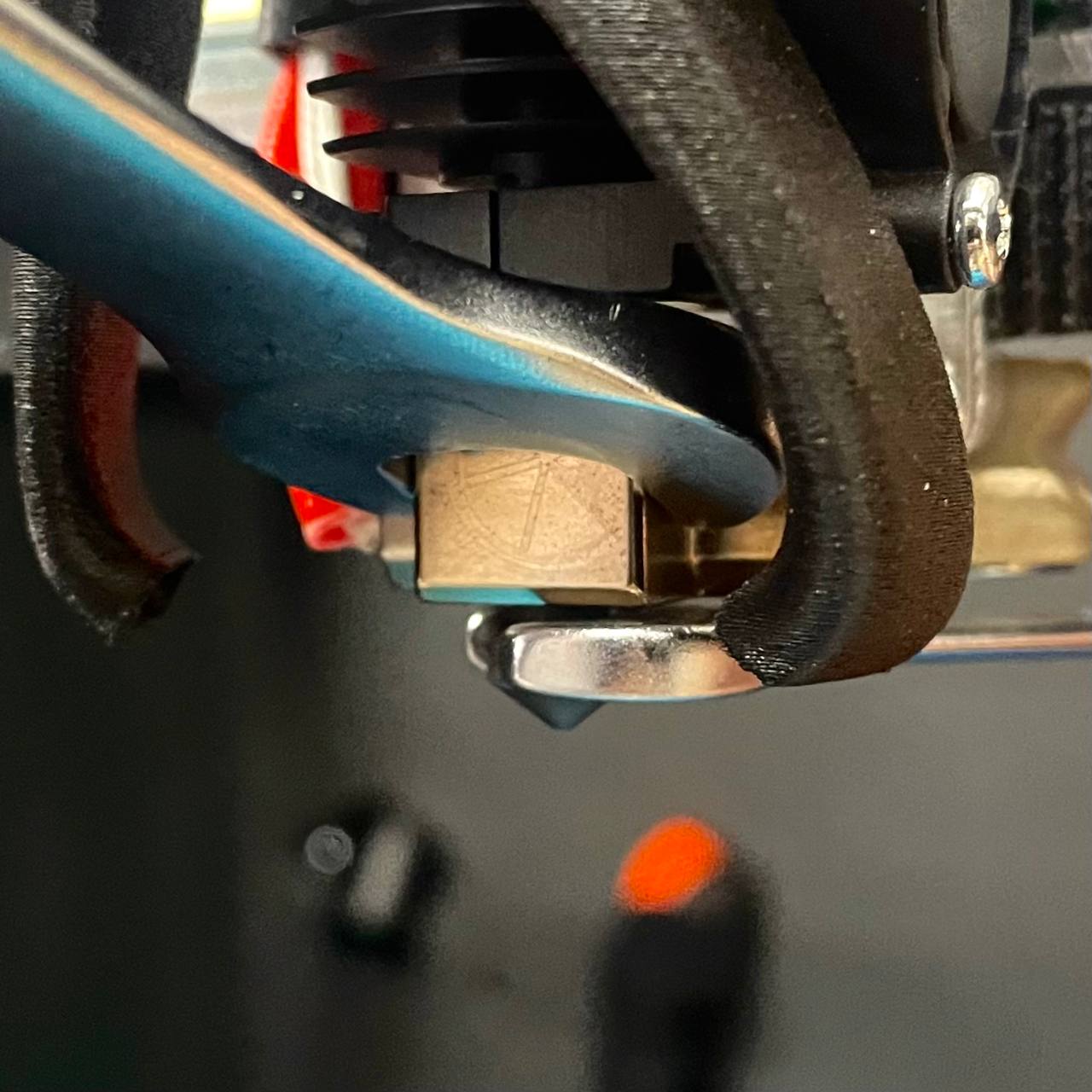
- If using a torque wrench (recommended), tighten to 1.5 Nm.
- If not using a torque wrench, tighten until the nozzle feels snug against the heatbreak. Then, apply a small additional turn (approximately 1/8th to 1/4th of a full rotation). The goal is a firm seal without excessive force. Do not overtighten.
- Once tightened, turn off the hotend heating and allow the assembly to cool down.
FAQ
Support
If you could not find an answer here, reach out to our support team.