Filament Breaks in Tube
Rigid PEEK and carbon-filled filament snapping in the PTFE tubes on the 22 IDEX V4 — cut the front cable-chain zip ties and reroute the tubes in the rear bay.
This guide explains why rigid filament can break inside the PTFE tubes on the Vision Miner 22 IDEX V4 and how to fix it.
Carbon-filled or glass-filled materials - especially higher-temperature filaments like PPS, PEEK, PEI, PEKK, and similar - are prone to snapping inside the PTFE tubes. Due to their high rigidity, these materials can break mid-path during printing or loading. The rear section of the V4 printer features numerous tube bends - a result of the increased path length required by the relocation of the filament runout sensors. The high number of turns creates tension zones that can cause brittle filament to break.
The goal is to give the PTFE tubes more freedom so they follow gentler curves instead of sharp bends. Apply these solutions in order - start with Solution 1 and add Solution 2 if the problem persists.
Before you begin - safety and risk
Read the Safety - Before You Begin article to understand the hazards involved in working on the Vision Miner 22IDEX V4 - including electrical, thermal, mechanical, and chemical risks. All procedures in this wiki are provided as recommendations only. By choosing to follow any procedure, you do so at your own risk.
1. Cut Zip Ties on the Cable Chains
The XY motion system on the 22 IDEX V4 has two cable chains (one per toolhead). Each cable chain has three zip ties securing the PTFE tube: one at the back, one in the middle, and one at the front near the extruder.
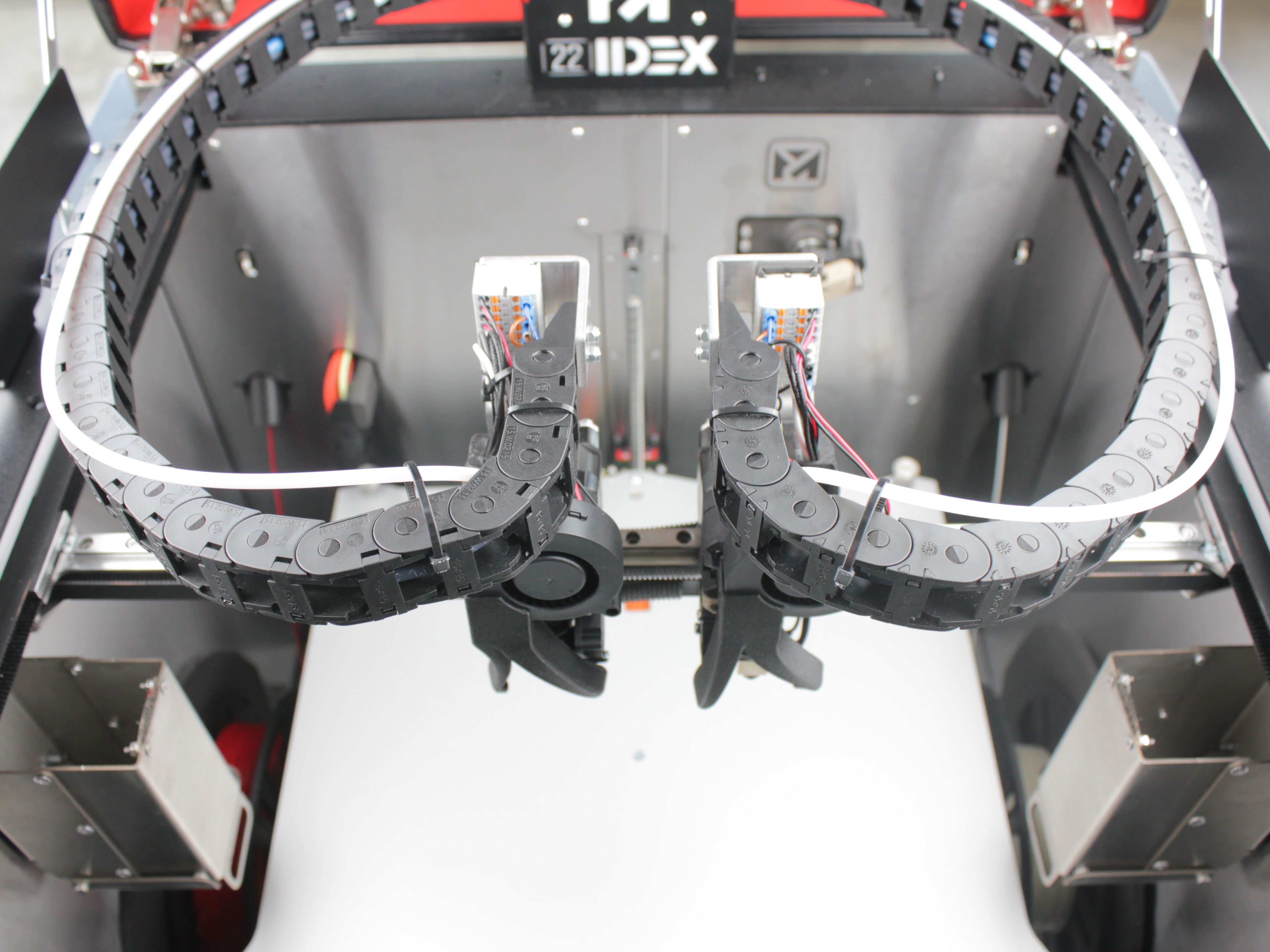
Cut the front zip tie - the one closest to the extruder head - on each cable chain. This frees the PTFE tube to take a wider, gentler path near the toolheads and reduces the forced bends that cause filament to snap.
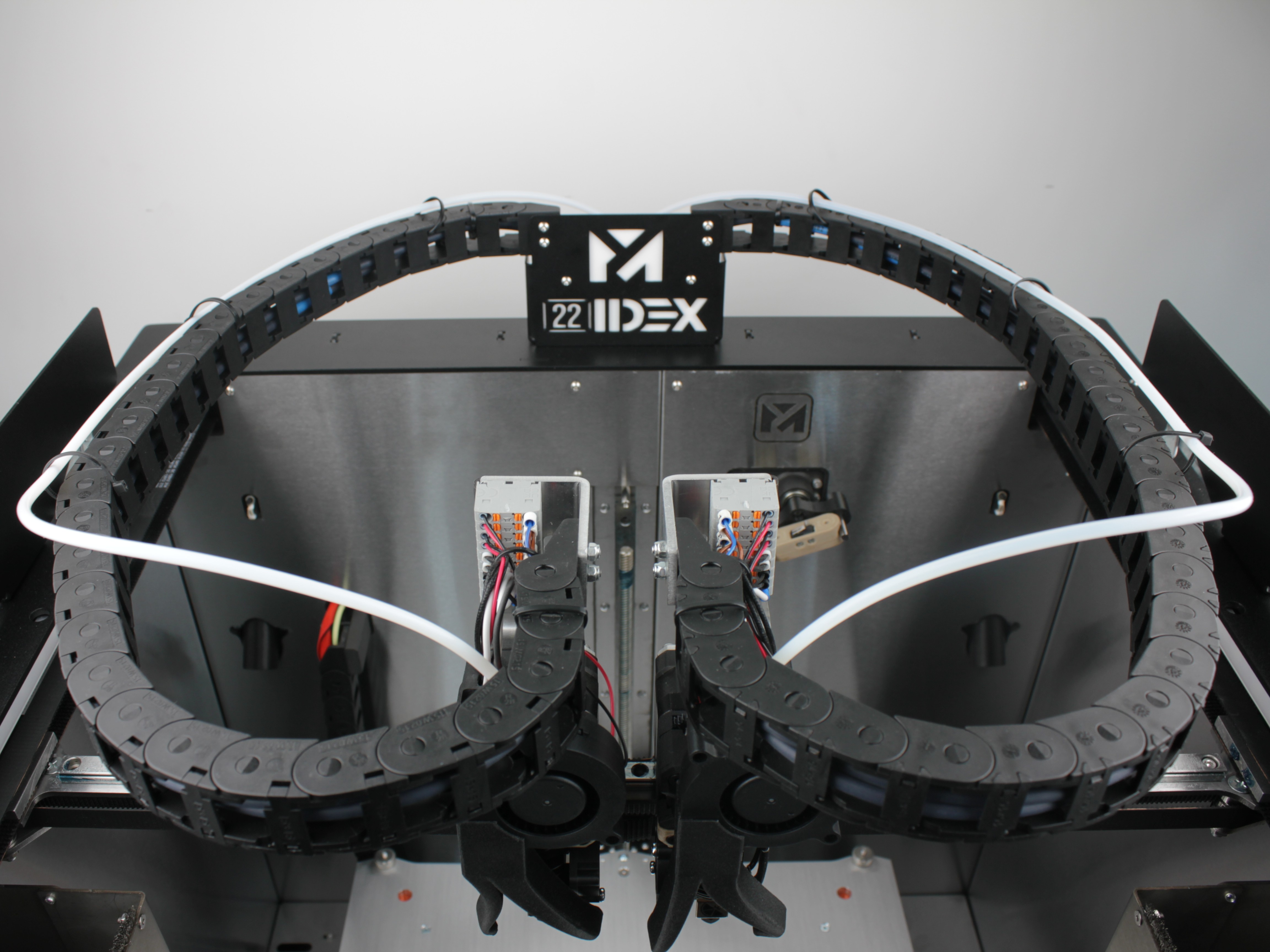
PTFE tube may contact lid insulation
After cutting the front zip tie, the PTFE tube may come into contact with the top lid insulation. This can lead to gradual wear of the insulation over time. Monitor for any rubbing during the first few prints.
If the problem persists after cutting the zip ties, also apply Solution 2 below.
2. Reroute the PTFE Tubes Through the Rear Bay
By default, the PTFE tubes in the rear electronics bay are neatly routed through holders and clips to keep them contained within the enclosure. This routing creates tight bends that rigid filament cannot tolerate. Rerouting the tubes to bypass these holders gives them significantly more freedom.
Disconnect power before opening rear bay
Turn off the printer and unplug it from the power outlet before opening the rear electronics bay. Make sure the printer is completely powered off before starting any work.
Wait at least 60 seconds after powering off for the capacitors to discharge.
Steps:
- Power off the printer and unplug it from the power outlet.
- Open the rear electronics bay doors.
- Locate the PTFE tubes - they are routed through a series of holders and quick-release connectors that keep them secured inside the bay.
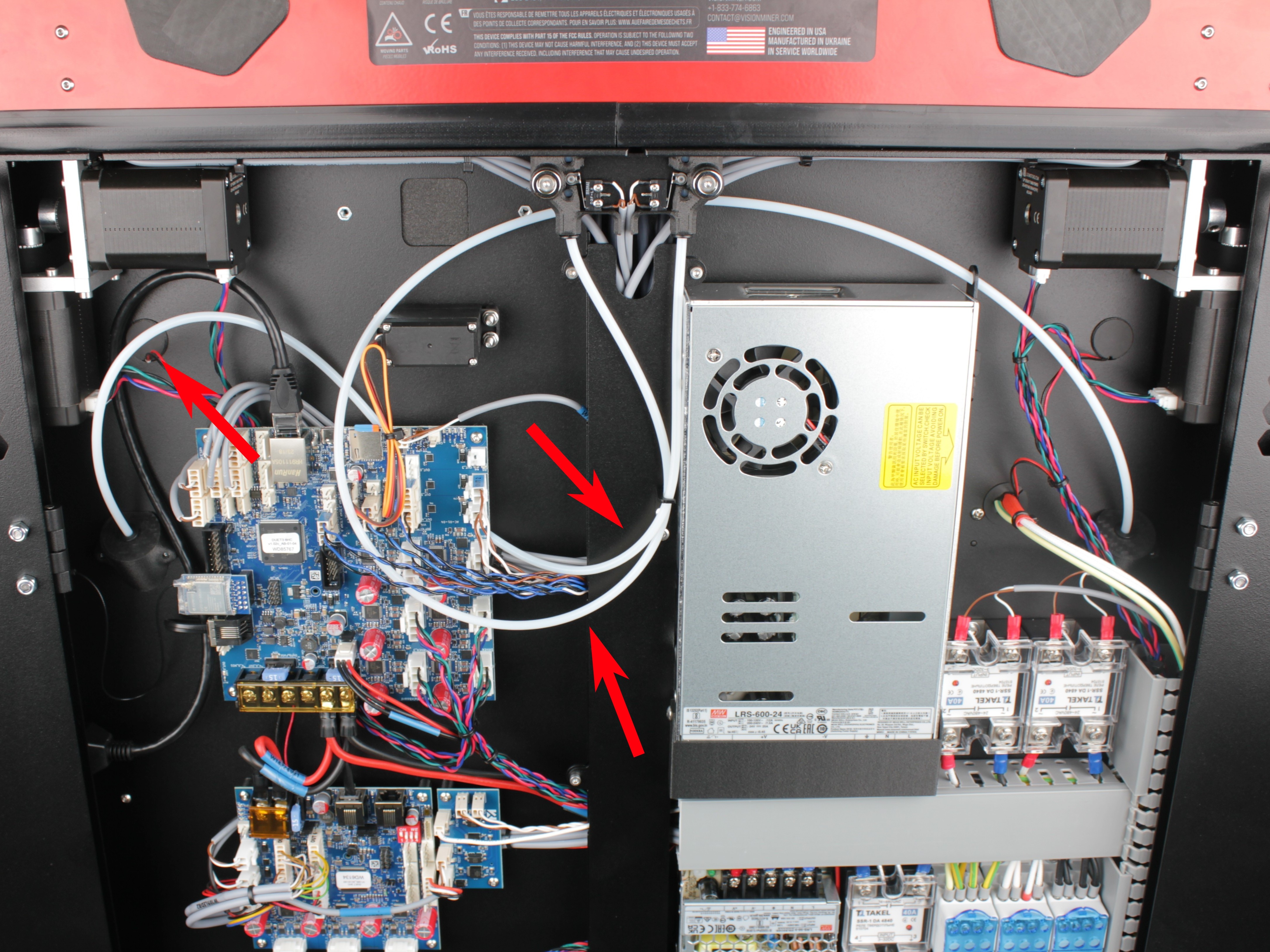
- Press the quick-release connector on each PTFE tube holder to unclip the tube.
- Reroute each PTFE tube so it bypasses the holders entirely. Let the tubes hang freely with gentle curves instead of being forced through the tight routing path.
- Close the rear bay doors if the tubes fit. If they do not close cleanly with the new routing, leave the rear doors open during printing and loading.
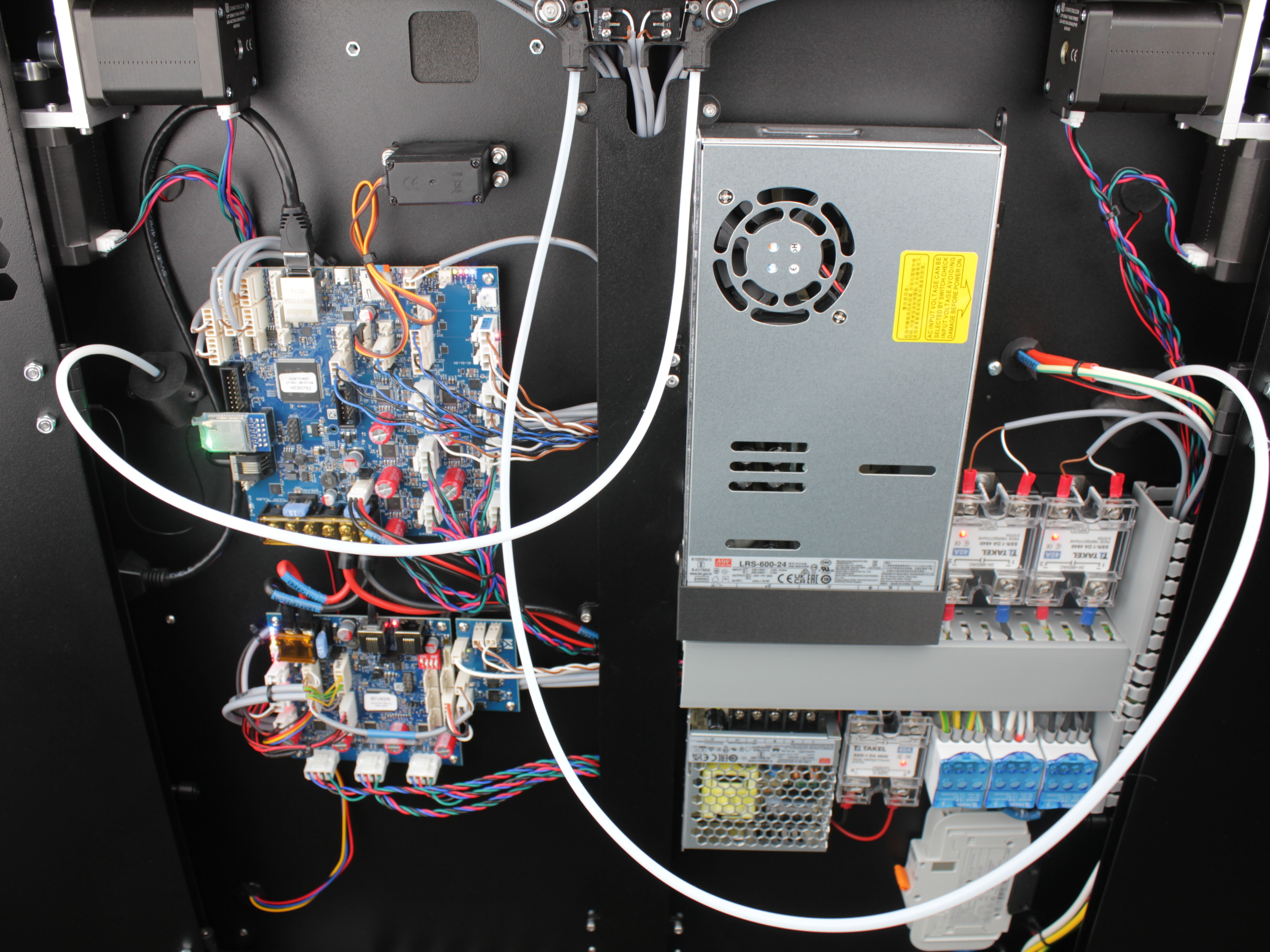
Operating with rear doors open - high voltage exposure
If the rear doors must remain open, the rear compartment of the printer is exposed. This area contains high-voltage wiring and electronics. Keep unauthorized personnel, children, and pets away from the rear of the machine while it is operating. Do not reach into the rear compartment while the printer is powered on.
Operating the printer with the rear electronics bay open reduces the thermal insulation of the chamber and exposes internal wiring and components. The operator is responsible for ensuring a safe working environment. Vision Miner is not liable for any injury, damage, or loss resulting from operation of the printer with covers or panels removed. This modification is performed at the user's own risk.
3. Alternative Routing Method (Customer-Tested)
Solution 2 above is the officially recommended method from Vision Miner. However, during testing, customers have discovered an alternative routing method that some users prefer. This alternative approach routes the PTFE tubes differently and may offer additional benefits depending on your specific setup and filament types.
Longer tubes required for this method
This alternative routing method requires longer PTFE tubes than what is shipped with the printer. If you would like to try this routing method, contact Vision Miner support to obtain the longer tubes.
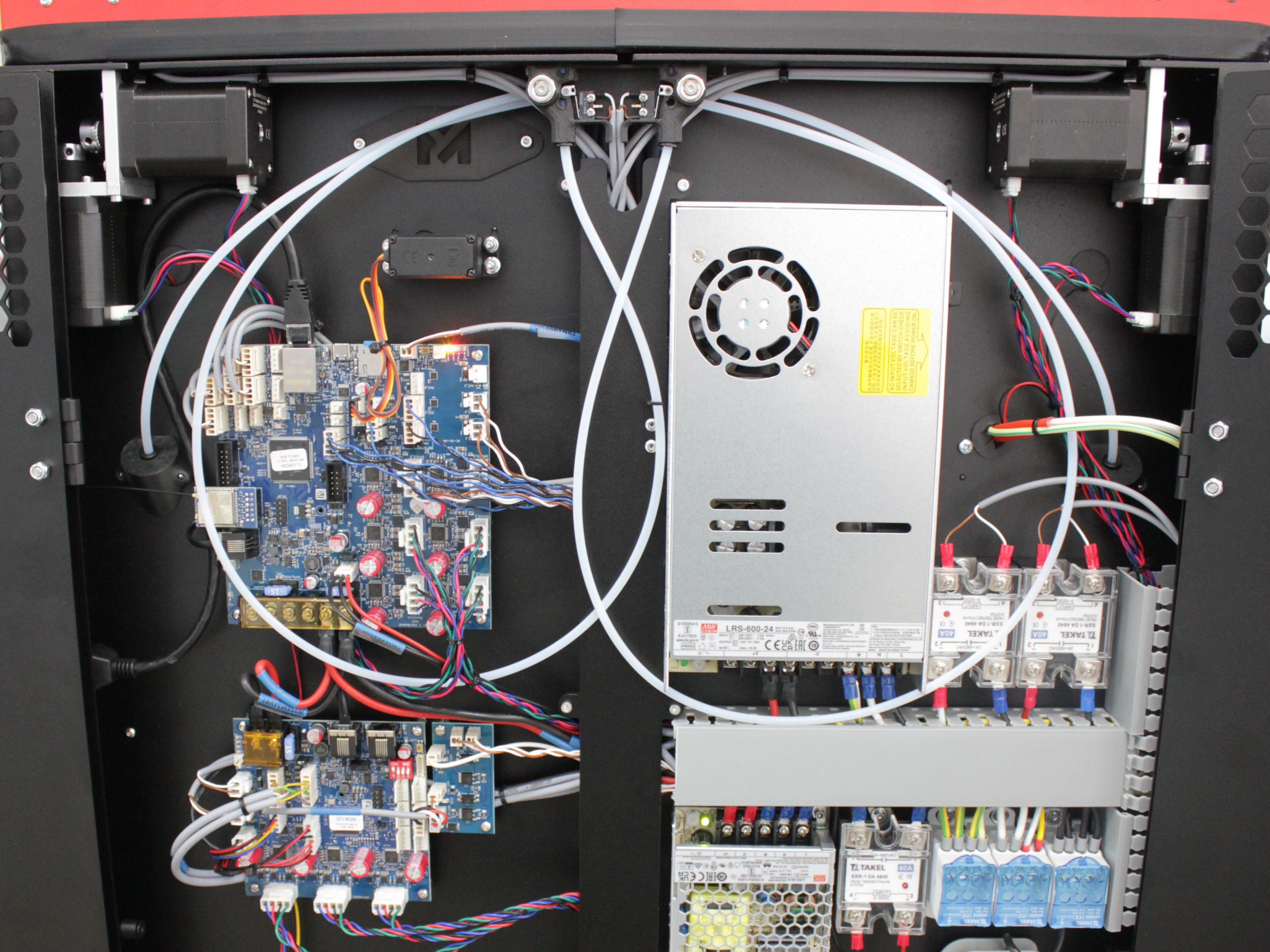
Result
After applying one or more of these solutions:
- The PTFE tubes follow significantly smoother and gentler curves.
- The tubes have more room to move, which reduces the mechanical stress on the filament.
- Rigid and brittle filament is far less likely to snap during printing or loading.
FAQ
Troubleshooting
Support
If you could not find an answer here, reach out to our support team.